OAuth clients let third-party applications access an iClosed workspace on behalf of a user — without sharing that user's API key. This guide covers how to register a client in the iClosed app, what to choose during setup, how the authorization flow works, how tokens are issued, and how client approval affects who can connect.
For endpoint-level request and response schemas, see the OAuth API Reference.
| Detail | Value |
|---|---|
| Protocol | OAuth 2.0 (authorization code + refresh token) |
| User consent URL | https://app.iclosed.io/oauth/authorize |
| Token endpoint | POST https://public.api.iclosed.io/v1/oauth/token |
| Client ID format | ocl_… |
| Access token lifetime | 1 hour |
| Refresh token lifetime | 30 days (rotated on each refresh) |
| PKCE | Required for public clients; optional for confidential clients |
OAuth access tokens use the same scope model as API keys (for example contacts:read, deals:write). Each API request made with an OAuth access token runs in the context of the workspace the user authorized.
OAuth clients are managed from the Developer area in your iClosed account settings — the same place as Webhooks and API Keys.
- Log in at app.iclosed.io.
- Open Settings → Developer.
- In the left sidebar, click OAuth Clients.
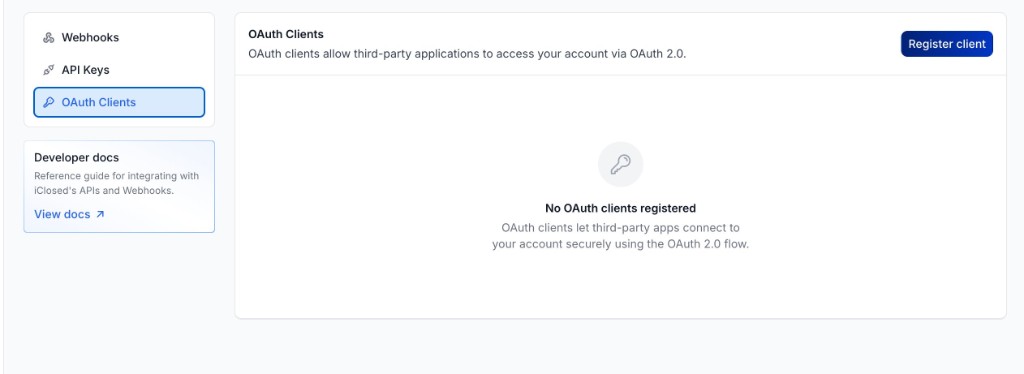
From this page you can:
- Register client — create a new OAuth application.
- View registered clients, their scopes, and approval status.
- Edit or delete clients you own (via the row menu).
OAuth clients are available on every iClosed plan, and a workspace can register up to 20 clients. If you do not see the Developer section, your role does not include access to it. Ask a Super Admin.
Click Register client to open the registration form.
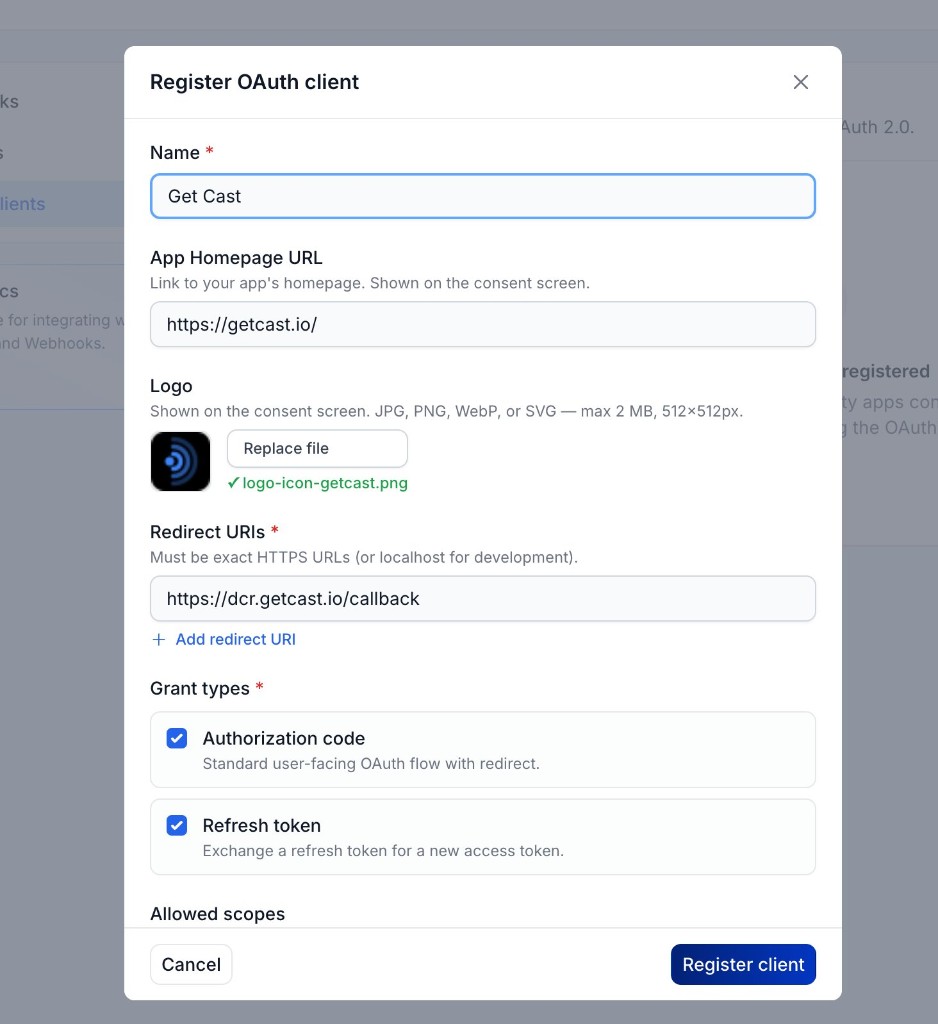
| Field | Required | What to enter |
|---|---|---|
| Name | Yes | Display name shown on the consent screen (for example Get Cast). |
| App Homepage URL | No | Link to your app's website. Shown on the consent screen so users know who is requesting access. |
| Logo | No | Square image (JPG, PNG, WebP, or SVG; max 2 MB, 512×512 px). Shown on the consent screen. |
| Redirect URIs | Yes | One or more callback URLs. Must be exact HTTPS URLs (or http://localhost for local development). Add multiple URIs with + Add redirect URI if you have staging and production environments. |
Redirect URI tips:
- The URI you send in the authorize request must match one of the registered URIs character for character (including trailing slashes).
- Use HTTPS in production. Localhost is allowed for development only.
Both grant types are typically enabled:
| Grant type | Purpose |
|---|---|
| Authorization code | Standard browser-based OAuth flow. Users sign in and approve access; your app receives a short-lived code to exchange for tokens. |
| Refresh token | Lets your app obtain new access tokens without asking the user to sign in again. |
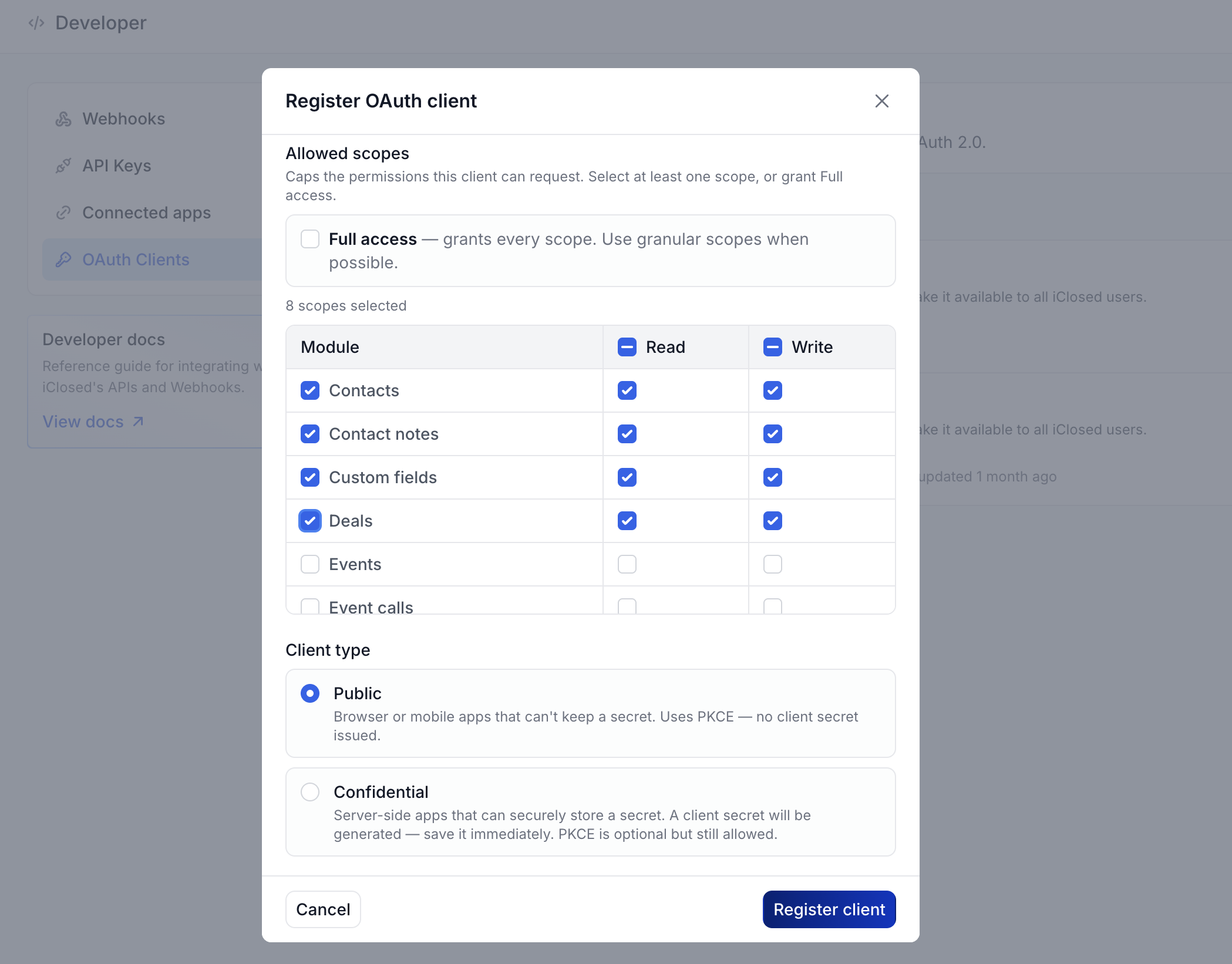
Scopes define the maximum permissions your app can request. When a user authorizes your app, they grant a subset of these scopes.
- Add scopes from the suggestion chips, or type a scope and press Enter.
- Only request scopes your integration actually needs — users see grouped permissions on the consent screen.
- Scope names follow the same pattern as API keys (for example
contacts:read,contacts:write,deals:read,events:write).
See the API Reference for the full list of available scopes on each endpoint.
Choose the client type based on where your app runs:
| Type | When to use | Secret | PKCE |
|---|---|---|---|
| Public | Browser apps, mobile apps, SPAs — anything that cannot store a secret securely | No client secret is issued | Required |
| Confidential | Server-side apps that can store credentials in a vault or environment variable | A client secret is generated once at registration — save it immediately | Optional (still supported) |
Choose Public if your code runs entirely in the user's browser or on a device you do not fully control.
Choose Confidential if token exchange happens on your backend and you can store client_secret securely.
Click Register client when the form is complete.
On success, iClosed shows your Client ID and next-step guidance.
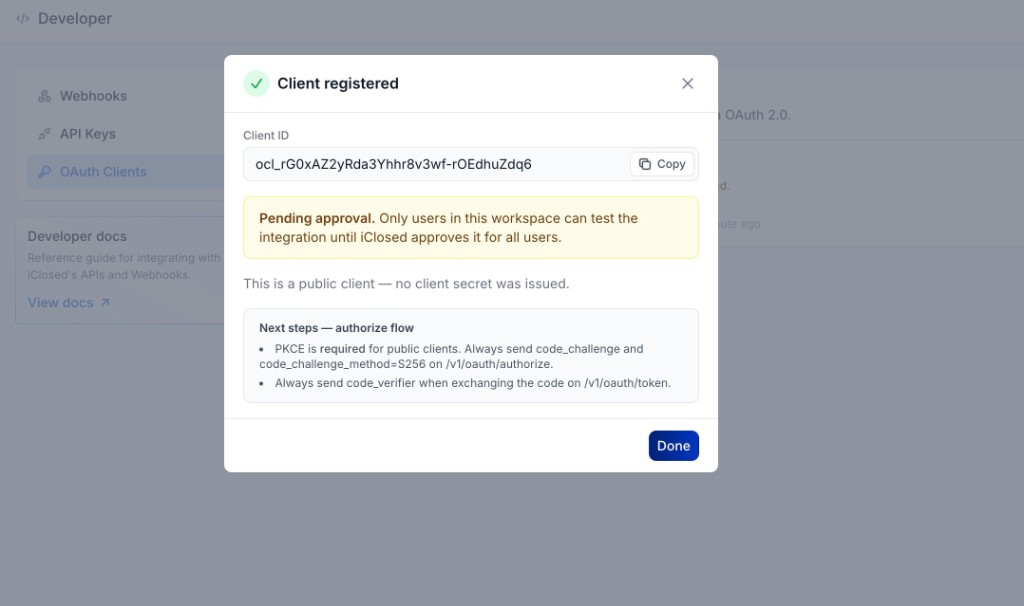
Save your Client ID — you need it to start the OAuth flow. If you registered a confidential client, also copy the client secret now; it is shown only once.
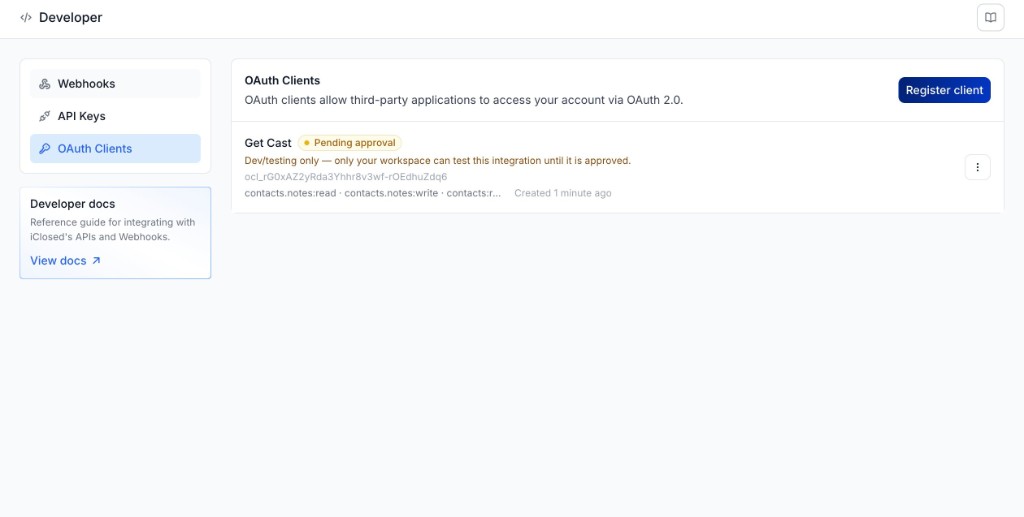
New clients registered through the Developer portal start in Pending approval status.
While pending:
- Only users in the workspace that registered the client can complete the OAuth flow and connect the app.
- Users in other iClosed accounts cannot authorize the app — they will see an access-denied message on the consent screen or receive a
403 access_deniederror.
This lets you build and test safely before the app is available to all iClosed customers.
To make your app available to users in any iClosed account, contact iClosed Support and request approval for your OAuth client. After iClosed approves the client (status moves to Approved or Active), any authenticated iClosed user can authorize it for their workspace.
| Status | Who can authorize |
|---|---|
| Pending | Users in the registering workspace only |
| Approved / Active | Any iClosed user (subject to consent) |
The iClosed OAuth flow follows the standard authorization code pattern with optional PKCE.
Redirect the user's browser to:
https://app.iclosed.io/oauth/authorizeInclude these query parameters:
| Parameter | Required | Description |
|---|---|---|
response_type | Yes | Must be code. |
client_id | Yes | Your ocl_… client ID. |
redirect_uri | Yes | One of your registered redirect URIs. |
scope | No | Space-delimited scopes to request. Must be a subset of your client's allowed scopes. If omitted, all allowed scopes are requested. |
state | Recommended | Opaque value returned unchanged on redirect — use it to prevent CSRF. |
code_challenge | Yes for public clients | PKCE challenge (see below). |
code_challenge_method | Yes when challenge is sent | Must be S256. |
Example (public client with PKCE):
https://app.iclosed.io/oauth/authorize
  ?response_type=code
  &client_id=ocl_rG0xAZ2yRda3Yhhr8v3wf-rOEdhuZdq6
  &redirect_uri=https://yourapp.example.com/oauth/callback
  &scope=contacts:read%20contacts:write
  &state=random-state-value
  &code_challenge=E9Melhoa2OwvFrEMTJguCHaoeK1t8URWbuGJSstw-cM
&code_challenge_method=S256If the user is not signed in, iClosed shows the login screen first. After authentication, the consent screen lists the app name, logo, and requested permissions.
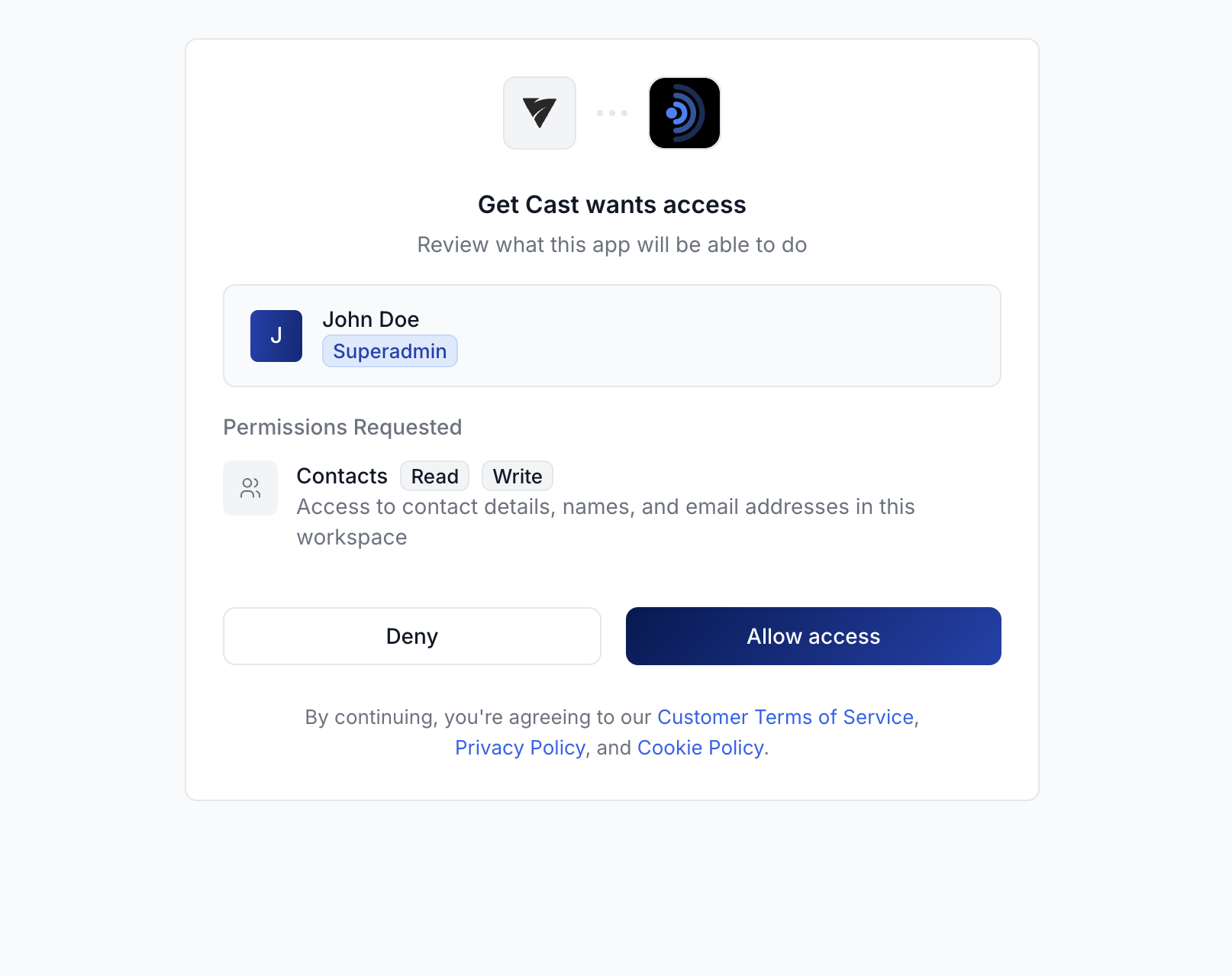
For pending clients, a yellow banner explains that only users in the registering workspace can connect for now.
The user can Allow access or Deny. On allow, iClosed shows a brief confirmation and redirects back to your redirect_uri.
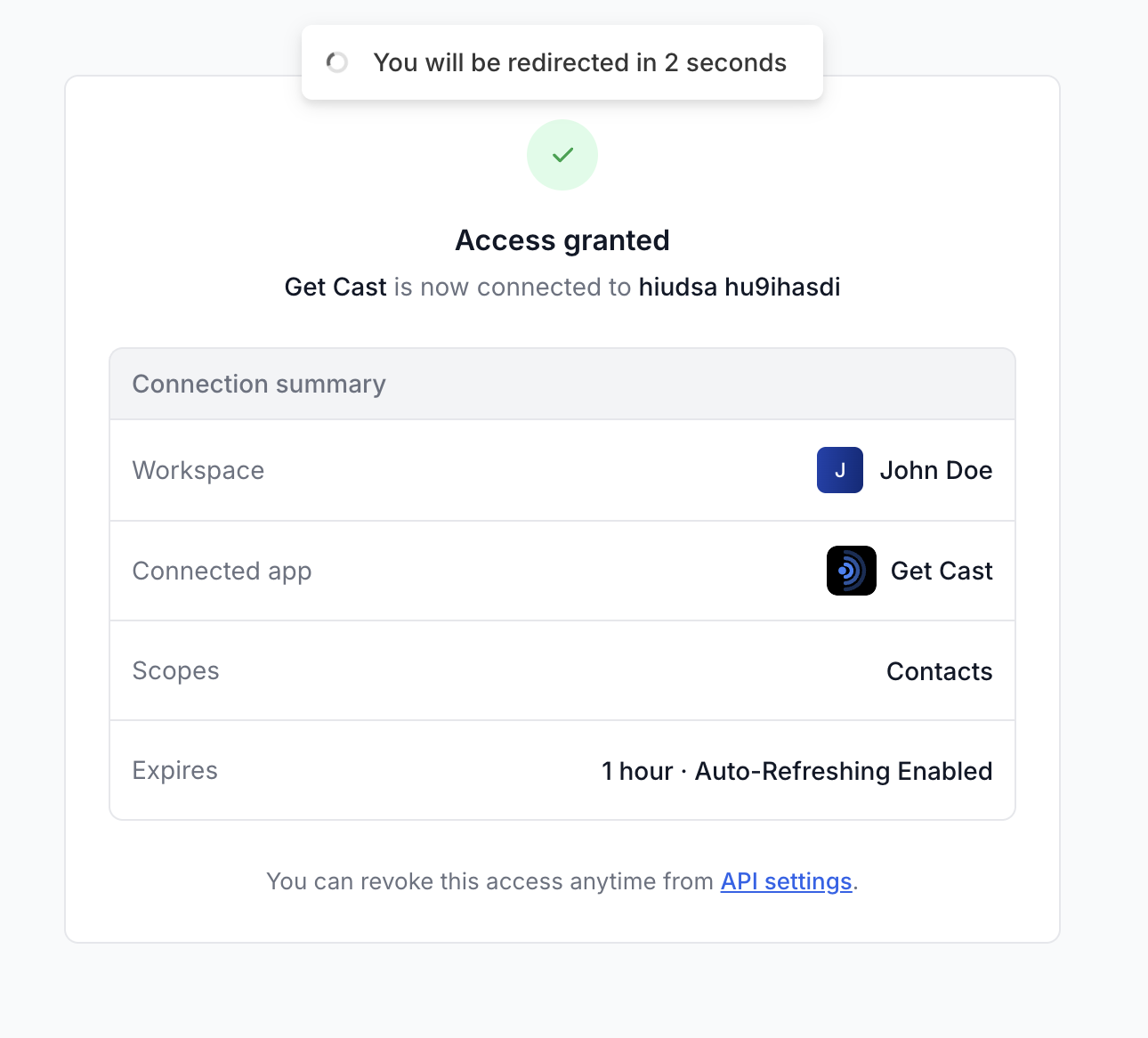
iClosed redirects the browser to your redirect_uri with:
https://yourapp.example.com/oauth/callback
  ?code=AUTHORIZATION_CODE
&state=random-state-value- Verify
statematches what you sent. - The authorization code is short-lived (10 minutes) and single-use.
- If the user denied access, the redirect includes
error=access_deniedinstead ofcode.
Send a server-side POST request to the token endpoint:
POST https://public.api.iclosed.io/v1/oauth/token
Content-Type: application/json
Authorization code grant (public client):
{
  "grant_type": "authorization_code",
  "code": "AUTHORIZATION_CODE_FROM_CALLBACK",
  "redirect_uri": "https://yourapp.example.com/oauth/callback",
  "client_id": "ocl_rG0xAZ2yRda3Yhhr8v3wf-rOEdhuZdq6",
  "code_verifier": "YOUR_PKCE_CODE_VERIFIER"
}
Authorization code grant (confidential client):
Authenticate with HTTP Basic auth (client_id:client_secret) or include credentials in the JSON body:
{
  "grant_type": "authorization_code",
  "code": "AUTHORIZATION_CODE_FROM_CALLBACK",
  "redirect_uri": "https://yourapp.example.com/oauth/callback",
  "client_id": "ocl_…",
  "client_secret": "YOUR_CLIENT_SECRET"
}
If you used PKCE on /authorize, include code_verifier even for confidential clients.
Successful response:
{
  "access_token": "eyJhbGciOiJIUzI1NiIsInR5cCI6IkpXVCJ9...",
  "token_type": "Bearer",
  "expires_in": 3600,
  "refresh_token": "kN9b-4wFQxQXoXr3Jra6D2xSAn8YvXSVF0yP9fvQX1A",
  "scope": "contacts:read contacts:write"
}
Store the refresh token securely. Access tokens expire after 1 hour.
Use the access token like an API key:
Authorization: Bearer <access_token>Example:
curl "https://public.api.iclosed.io/v1/contacts/detail?email=jane@example.com" \
  -H "Authorization: Bearer ACCESS_TOKEN" \
  -H "Content-Type: application/json"
The token is scoped to the workspace the user selected during authorization and limited to the granted scopes.
When expires_in has passed, exchange the refresh token for a new pair:
{
  "grant_type": "refresh_token",
  "refresh_token": "YOUR_REFRESH_TOKEN",
  "client_id": "ocl_…"
}
For confidential clients, also send client_secret (or use Basic auth). iClosed rotates refresh tokens — save the new refresh_token from each response and stop using the old one.
Public clients must use PKCE. Generate a code_verifier (43–128 random URL-safe characters), then derive the challenge:
// Node.js example
import { createHash, randomBytes } from 'crypto';

const codeVerifier = randomBytes(32).toString('base64url');
const codeChallenge = createHash('sha256')
  .update(codeVerifier)
.digest('base64url');- Store
codeVerifierin the user's session (or your server session). - Send
code_challengeandcode_challenge_method=S256on the/oauth/authorizeURL. - Send
code_verifierwhen calling/v1/oauth/token.
If the verifier does not match the challenge, token exchange returns invalid_grant.
Users can disconnect an app from Settings → Developer → Connected apps: click Revoke on one connection, or Revoke all for every connection to that app. After revocation, existing tokens stop working and the app has to ask for access again.
Call the revocation endpoint:
POST https://public.api.iclosed.io/v1/oauth/revoke
Content-Type: application/json

{
  "token": "ACCESS_OR_REFRESH_TOKEN",
  "token_type_hint": "refresh_token",
  "client_id": "ocl_…"
}
Confidential clients must authenticate with client_secret. The endpoint is idempotent.
- Use the minimum scopes needed for your integration.
- Never expose client secrets in browser or mobile code — use a public client with PKCE instead.
- Always validate
stateon the callback to prevent CSRF. - Store refresh tokens encrypted on your server.
- Use HTTPS redirect URIs in production.
- Rotate credentials if a secret or refresh token is leaked — revoke old tokens immediately.
- Request production approval from iClosed Support before listing your integration to customers outside your workspace.
- Authentication — API keys (alternative to OAuth for single-workspace server integrations)
- Rate Limiting — OAuth token requests count toward the same rate limits as API keys
- Errors — HTTP and application error reference
- OAuth API Reference — Full endpoint schemas